Review Guideline
Thank you for sharing your hotel experiences on CheckinView. Our mission is to deliver authentic reviews that are as close to an onsite-experience as possible, maintaining our trustworthiness as a reliable source for hotel recommendations.
To support our mission, please adhere to our Terms and the below Review Guidelines.
Videos and Photos Orientation
We accept both landscape and portrait mode videos and photos.
File Size
The maximums size of a video is preferably 100MB.
Accepted Formats: 3GPP, AVI, FLV, MOV, MPEG4, MPEGPS, WebM, and WMV.
Overlays
To maintain authenticity, please refrain from uploading media with overlays such as filters, logos, texts, icons, or images of people who have not consented to public display of their likeness. For more details, refer to our Terms.
Content Appropriateness
Do not upload videos and photos containing objectionable content, including but not limited to nudity, violence, or other offensive or illegal material.
Right to Reject
We reserve the right to disregard any videos and photos that do not meet our requirements or that we consider potentially inappropriate or offensive.
Language
While English is the primary language of CheckinView, you are welcome to write your review in any language.

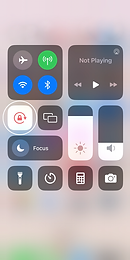
Landscape mode
iOS

Android

Recording Mode on a Mobile Device
Unlock screen rotation for landscape mode
Portrait mode
Reducing Video Resolution on Android
Lower resolutions produce smaller files that are easier to store and share, saving storage space without significantly compromising video quality.
Step-by-Step Guide:
-
Open the Camera app and switch to Video mode.
-
Tap the gear icon (⚙️) to open Settings.
-
Find and select Video resolution or Video size.
-
Choose a lower resolution like 1080p or 720p to save space.
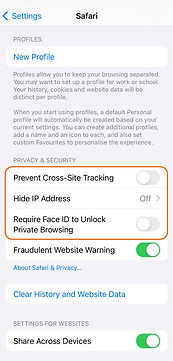
If videos won’t play, turn off the Safari settings below